
Tutorials & How-To Guides
THE ESSENTIALS
Make booking easier. Keep your toolkit simple.
Start with a mobile-friendly booking page, flexible availability, clear treatment durations and calendar conflict checks. Add deposits, reminders and other tools when they meet a real need.
When you're running a beauty business on your own, you're not just the person delivering the treatments. You're also the receptionist, appointment manager, marketing department and accounts team.
Between appointments, you're replying to Instagram messages, answering booking enquiries, checking your calendar and trying to find a suitable time for your next client.
Sound familiar?
Online booking software can take a lot of that work off your hands. But with so many platforms offering everything from appointment scheduling to point-of-sale systems, inventory management and marketing automation, it's easy to end up paying for features you'll never use.
The good news? Most solo beauty professionals need far less than they think.
In this guide, we'll explain what to look for in booking software, what matters for different types of beauty businesses, and how to choose a system that makes your working day easier without adding unnecessary costs.
Why Solo Beauty Professionals Need a Different Kind of Booking Software
A large beauty salon with ten employees has very different requirements from a nail technician working from a home studio.
Larger businesses may need staff rosters, payroll integration, inventory tracking, multiple locations and detailed business reporting.
If you're working independently, your priorities are probably much simpler:
- Let clients book appointments without messaging you.
- Show only the times you're actually available.
- Avoid overlapping appointments.
- Allow clients to choose the right treatment.
- Take deposits when necessary.
- Reduce cancellations and no-shows.
- Keep your monthly software costs under control.
You don't necessarily need a complete salon management platform to achieve these things.
A reliable online booking system that handles the essentials can be more valuable than an expensive platform packed with features.
The Essential Booking Software Checklist
Before signing up for any appointment scheduling software, use this checklist to evaluate what you're actually getting.
1. A Simple Online Booking Page
Priority: Essential
Your clients should be able to book an appointment without calling, texting or waiting for you to respond.
Look for a booking system that provides:
- A dedicated booking link you can share with customers.
- A mobile-friendly booking experience.
- Clear appointment options and available times.
- A straightforward confirmation process.
- A booking page that displays your business name or branding.
For example, a nail technician could add a Book Now link to their Instagram bio. Customers browsing their work in the evening can immediately select an appointment instead of sending a DM and waiting until the following morning.
Your booking page should work even when you're not working.
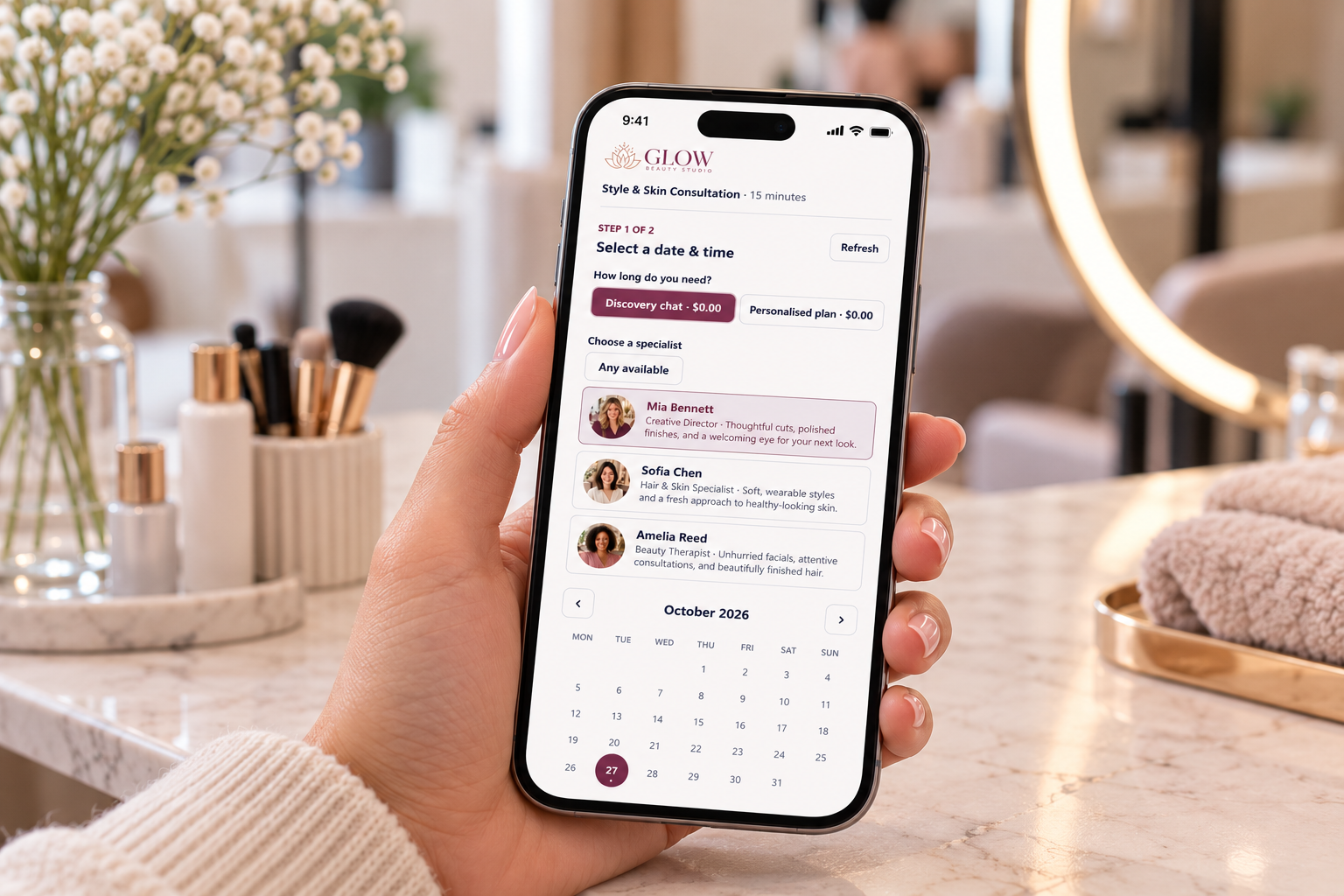
A mobile booking experience helps clients choose an appointment wherever they are. Supplied illustration shows an example with staff selection, available on eligible plans.
2. Flexible Working Hours and Availability
Priority: Essential
One of the biggest advantages of working independently is choosing your own schedule.
Your booking software should respect that flexibility.
Look for features that let you:
- Set different working hours for each day.
- Block holidays, breaks and personal appointments.
- Add buffer time between clients.
- Require a minimum amount of notice before bookings.
- Limit the number of appointments you accept each day.
Example: You're a home-based beauty therapist who works from 9 am to 2 pm on school days and occasionally offers evening appointments.
Your booking system should accommodate that schedule without requiring you to manually approve every request.
For mobile hairdressers, buffer times are particularly important because travelling between appointments takes time.
3. Different Appointment Types and Durations
Priority: Essential for most beauty professionals
Not every treatment takes the same amount of time.
A nail technician might offer:
Treatment
Example duration
Gel polish removal
20 minutes
Express manicure
30 minutes
Gel manicure
60 minutes
Full set of acrylic nails
90 minutes
Detailed nail art
120 minutes
Durations are illustrative — set yours according to how you actually work.
Your booking software should allow you to configure appointment types with different durations, descriptions and booking rules.
Otherwise, you risk having clients book a short appointment for a service that needs considerably more time.
If you have an extensive treatment menu, consider a system that displays services and prices in a dedicated catalogue.
4. Calendar Synchronisation and Double-Booking Protection
Priority: Essential
Managing appointments across different calendars can quickly become confusing.
Perhaps you use Google Calendar for personal commitments and another calendar for work.
Your booking platform should ideally connect with your existing calendar and check for conflicts before offering times to clients.
Look for:
- Google Calendar or Microsoft Outlook calendar integration.
- Automatic availability updates.
- Conflict checks before confirming appointments.
- Synchronisation of new bookings to your calendar.
This is particularly useful when you have personal commitments throughout the working week.
A good booking system should help prevent clients from booking time you've already reserved.
5. Deposits and Online Payments
Priority: Highly recommended
No-shows and last-minute cancellations can be particularly costly when you're working alone.
If a client misses a two-hour appointment, you may have no opportunity to replace that income.
A booking system that supports online payments can help you introduce a deposit policy.
For example, you might require:
- A $20 deposit for a standard appointment.
- A $50 deposit for a longer colour treatment.
- Full prepayment for selected services.
- No upfront payment for an initial consultation.
Choose software that makes the amount payable clear before customers confirm.
Also check whether the platform allows you to connect your own payment provider, such as Stripe.
Watch out for transaction costs: Some booking platforms charge additional booking or payment-related fees on top of their subscription. Payment processors may also charge their own transaction fees.
Always compare the total cost, not just the advertised monthly price.
6. Booking Confirmations and Reminders
Priority: Recommended
Sometimes clients simply forget their appointments.
Automated confirmation and reminder emails can reduce the amount of manual follow-up you need to do.
Consider whether the software provides:
- Immediate booking confirmation emails.
- Appointment reminders.
- Clear appointment details.
- Cancellation and rescheduling links.
- The ability to communicate your cancellation policy.
Check which communication channels are supported. Email reminders and SMS reminders are not necessarily included in the same plan, and SMS may incur additional charges.
7. Easy Cancellations and Rescheduling
Priority: Recommended
Plans change. Clients get sick, work late or need to collect their children unexpectedly.
Without an online rescheduling option, every appointment change becomes another phone call or message.
Ideally, clients should be able to reschedule or cancel through a secure link, subject to your booking policies.
This saves time while keeping your calendar updated.
8. Integration with Your Website and Social Media
Priority: Recommended
You don't necessarily need an expensive website to accept online bookings.
For many independent beauty professionals, a dedicated booking page is enough to get started.
You should be able to share your booking link through:
- Instagram and Facebook.
- Your Google Business Profile.
- WhatsApp or SMS conversations.
- Email signatures.
- Your existing website.
If you already have a WordPress website, look for a platform that lets you embed the booking experience directly into a page.
That way, visitors can discover your services and book without navigating through multiple websites.
Different Beauty Businesses Have Different Needs
Although many booking features are universal, the way you work should influence which software you choose.
Home-Based Beauty Salons
If you operate from a home studio, your biggest priorities are usually controlling availability, managing treatment durations and protecting your personal time.
Look for:
- Flexible business hours.
- Booking buffers between treatments.
- Different appointment durations.
- Deposits and cancellation policies.
- Control over what business information you share publicly.
Practical tip: If your salon operates from your home, consider whether you want your full residential address displayed publicly or provided only to confirmed clients. Check how each platform handles this before publishing your booking page.
Mobile Hairdressers and Beauty Therapists
Mobile professionals have an additional challenge: travel time.
If you're visiting multiple clients during the day, your schedule needs to account for the time spent driving, setting up and packing away equipment.
Prioritise:
- Sufficient buffers between bookings.
- Advance booking notice.
- Flexible working hours.
- Client address or location questions.
- Clear travel fees and service-area policies.
Some booking platforms offer advanced geographic scheduling or route optimisation, but these are not universal features.
If you travel extensively between appointments, test these capabilities specifically rather than assuming they're included.
Independent Nail Technicians
For nail technicians, appointment duration and service selection are often the most important considerations.
A basic manicure might take 30 minutes, while detailed nail art could require two hours.
Look for:
- Multiple treatment options.
- Configurable service durations.
- Clear pricing.
- Appointment preparation or intake questions.
- Deposits for longer appointments.
- Enough flexibility for removal or additional nail-art time.
You may also want clients to describe their desired nail design before arriving, so you can plan the appointment appropriately.
Independent Massage, Brow, Lash and Wellness Practitioners
Many independent practitioners work with a small number of longer appointments rather than a continuous stream of short services.
Useful features include:
- Custom appointment lengths.
- Breaks between sessions.
- Minimum booking notice.
- Intake or preparation questions.
- Secure rescheduling.
- Booking confirmations and reminders.
If you collect health information or other sensitive client details, confirm that your chosen software provides appropriate privacy and security protections before using it to store that information.
Features You Probably Don't Need — At Least Not Yet
Booking software providers often promote long feature lists.
But if you're working independently, you might not need:
- Staff rostering and payroll: Unless you're planning to employ other professionals.
- Inventory management: If you already manage your products separately.
- Multi-location management: If you work from one studio or operate independently.
- Complex point-of-sale systems: If you're happy using your existing payment methods.
- Advanced reporting dashboards: If basic booking and payment records meet your needs.
- Marketplace discovery features: If most of your clients already find you through word of mouth, social media or Google.
These features aren't inherently unnecessary. They simply may not justify paying more if you don't use them.
Choose software for the business you operate today, while leaving yourself room to grow.
How Much Should Booking Software Cost?
When comparing online booking systems, it's tempting to focus on the advertised monthly subscription.
But that's only part of the picture.
Before committing, check these costs:
Cost
What to check
Subscription
Is it charged monthly, annually or per user?
Booking limits
Are there limits on confirmed appointments?
Payment fees
Does the software add fees on top of payment processing?
Client acquisition fees
Are there commissions on customers acquired through a marketplace?
Reminders
Are email and SMS reminders included?
Extra features
Are deposits, website embedding or branding paid upgrades?
Long-term cost
What will you spend over one, two or three years?
For example, a $30 monthly subscription costs $360 per year, or $1,080 over three years, before any additional charges.
A cheaper subscription might provide everything you need, while a more expensive platform could be worthwhile if its extra features genuinely save time or increase revenue.
There isn't one correct price for every business.
The aim is to find a system where the value comfortably exceeds the cost.
Where Does ClimbCal Fit In?
ClimbCal is online appointment scheduling software designed for independent professionals and small teams.
Rather than requiring a complete salon management system, it gives you tools to publish booking pages, manage availability, connect calendars and accept appointments online.
For solo professionals, relevant features include:
- Branded booking pages: Share a professional booking link with your clients.
- Flexible availability: Set working hours, buffers, notice periods and appointment limits.
- Calendar integration: Connect Google or Microsoft calendars and help prevent double bookings.
- Custom appointment types: Define appointment durations, booking questions and policies.
- Online payments: Accept payments or fixed deposits through Stripe.
- Website integration: Embed booking pages into your existing website on supported paid plans.
- Customer rescheduling: Let clients use secure links to change or cancel bookings.
ClimbCal also provides more advanced Service Bookings features, including service catalogues, service pricing, staff profiles and team scheduling.
These can be useful if you operate a beauty studio with several treatments or plan to expand beyond working alone.
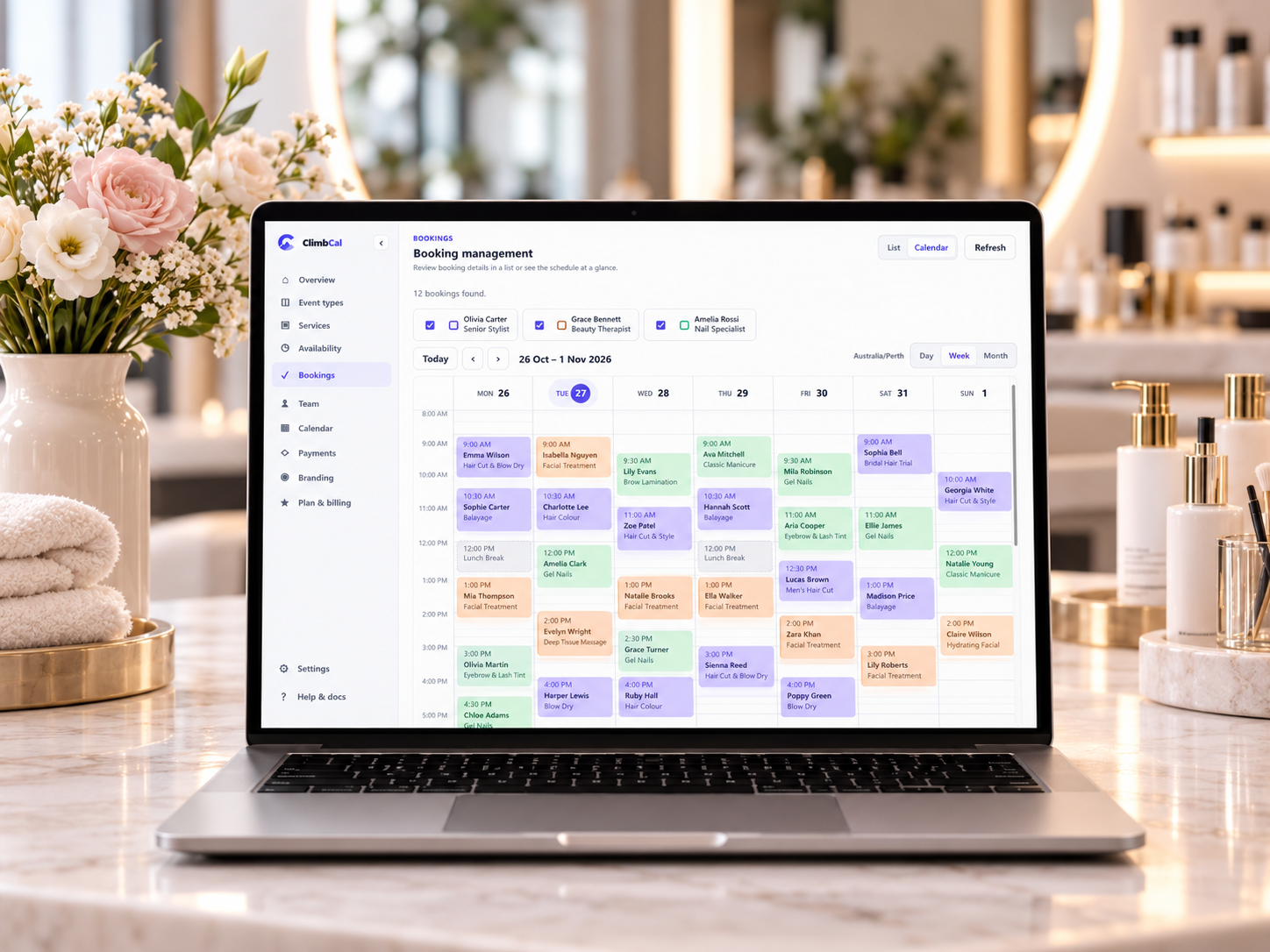
An illustrative ClimbCal calendar view. Service catalogues, staff profiles and team scheduling are Advanced features, also included with the Lifetime licence.
Which ClimbCal Plan Makes Sense?
The best option depends on how you intend to use it.
Free: Suitable for exploring the platform or accepting occasional appointments. The Free plan currently includes one active appointment type, one calendar connection and up to 10 confirmed bookings per month.
Standard: Designed for solo professionals who need unlimited appointment types and bookings, calendar connections, branded booking pages, website embedding and Stripe payments.
Advanced: Suited to businesses that need a customer-facing service catalogue, team scheduling, staff selection or automatic 24-hour email reminders.
ClimbCal also offers a limited-time Lifetime licence with Advanced features and five seats included for a one-off payment.
ClimbCal does not charge a commission on bookings or payments processed through your connected Stripe account. Stripe's own payment-processing fees still apply.
You can compare ClimbCal's current plans and pricing here.
A Practical Test Before Choosing Booking Software
Before paying for any platform, try it from your customer's perspective.
Here's a quick test you can complete with most booking systems.
- ☐ Create an appointment: Set up one of your most popular services with its correct duration.
- ☐ Set your availability: Configure your normal hours and block a personal commitment.
- ☐ Make a test booking: Open the booking page on your phone and see how easy it is to book.
- ☐ Check for conflicts: Make sure the software doesn't offer a time you've already blocked.
- ☐ Test the customer experience: Check the confirmation, payment, cancellation and rescheduling steps.
If possible, ask a friend to make a test booking without giving them instructions.
If they struggle to understand the process, your real clients might too.
A booking system should make booking simpler for both you and your customers.
Final Thoughts: Keep It Simple and Focus on What Matters
You don't need the most expensive booking software to run a professional beauty business.
Whether you're a home-based nail technician, mobile hairdresser, independent lash artist or beauty therapist, the fundamentals are largely the same.
You need a system that lets customers book easily, respects your working hours, prevents scheduling conflicts and reduces the time you spend managing appointments.
Everything else is optional until your business genuinely needs it.
Start with the essentials. Choose something that's easy for your clients to use and straightforward for you to manage.
As your business grows, you can add more advanced features when they begin to deliver real value.
Ready to Spend Less Time Managing Bookings?
See how online appointment scheduling works before committing to anything.
With ClimbCal, you can explore a working booking experience from your customer's perspective, without registering or providing payment details.
Try the interactive ClimbCal booking demo →
Or start using ClimbCal for free and create your own booking page.
More time for your clients. Less time managing your calendar.
See booking from your client’s perspective
Explore the interactive booking demo. No registration or payment details required.
SEE IT IN ACTION
A simpler way to take bookings
Try a working booking page before choosing your plan.
Try the booking demo →Or start free