
☰ Menu
Who It’s For
Resources
☰ Menu
Who It’s For
Resources
Home / Who it’s For / Beauty Salons
BOOKING SOFTWARE FOR BEAUTY SALONS
From facials to brows and nail appointments, let clients choose a treatment and a time that fits your team, without interrupting the appointment you’re already in.
✓ Let clients choose a treatment and available therapist
✓ Keep your team’s bookings in one shared view
✓ Offer Stripe-powered deposits or upfront payments
Service catalogues and staff selection are available with Advanced.
Click or tap the image to enlarge. Real ClimbCal demo: a client choosing a specialist and an available appointment. Demo businesses, staff and appointments are fictional.
A branded link clients can use themselves
Google and Microsoft calendar sync
Connect your own Stripe account
DESIGNED FOR THE SALON FLOOR
A booking experience for busy treatment rooms, reception-free studios and small beauty teams.
01
Clients can choose an available appointment online while you focus on the person in front of you.
Client self-booking
02
Assign eligible staff to a facial, brow service or manicure, with the right appointment lengths for each.
Services + team
03
Set buffers and notice periods around treatments, and check connected calendars before offering a slot.
Availability controls
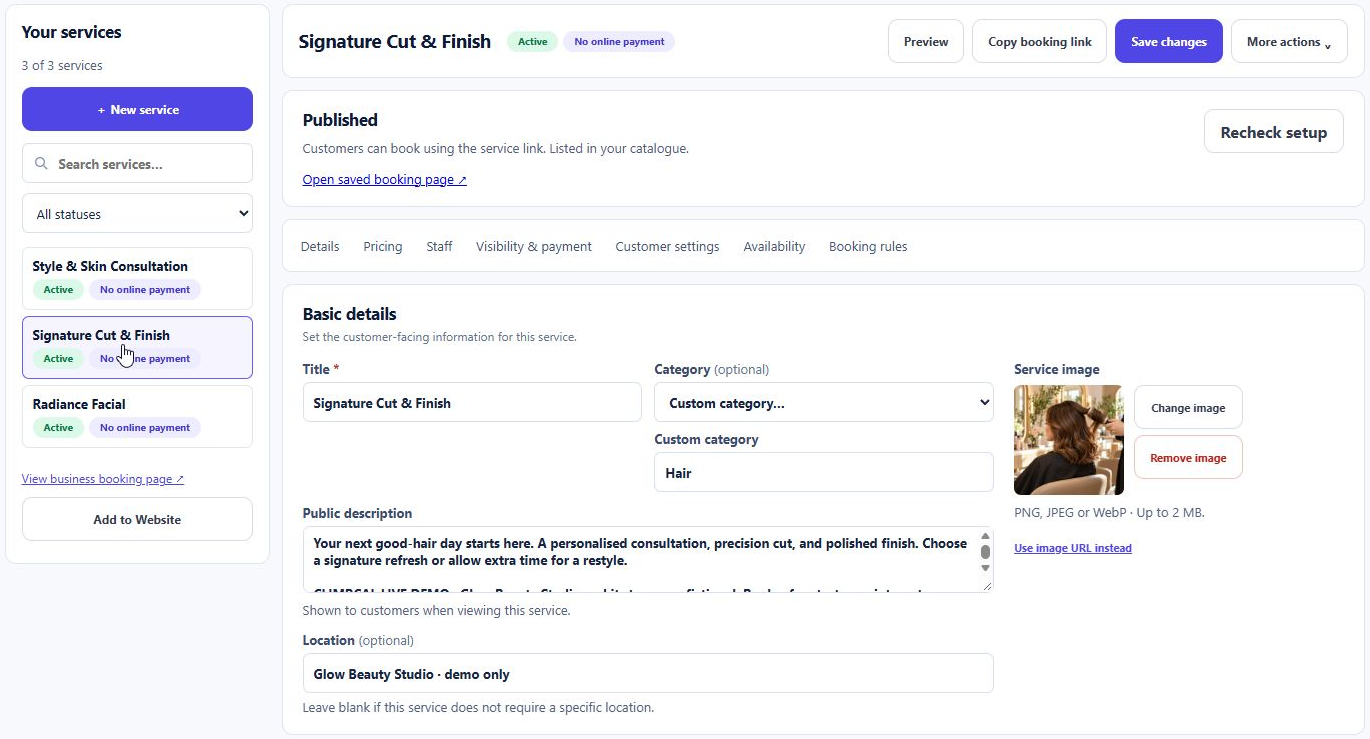
Real ClimbCal service editor, shown with the Glow Beauty Studio demo.
A SMOOTHER CLIENT EXPERIENCE
List your facials, brow treatments and nail services with clear descriptions and durations. Share your branded booking link from your website, Instagram bio or Google Business Profile.
✓ Clients select a service, therapist and available time
✓ Ask booking questions to collect useful appointment details
✓ Let clients reschedule or cancel using secure links
AVAILABILITY THAT FITS YOUR TEAM
A part-time brow specialist and a full-time beauty therapist don’t need the same diary. Set individual working hours and date overrides, then review bookings across your workspace.
✓ Set weekly hours for each team member
✓ Block leave and adjust availability for specific dates
✓ Use connected calendars and conflict checks to protect existing commitments
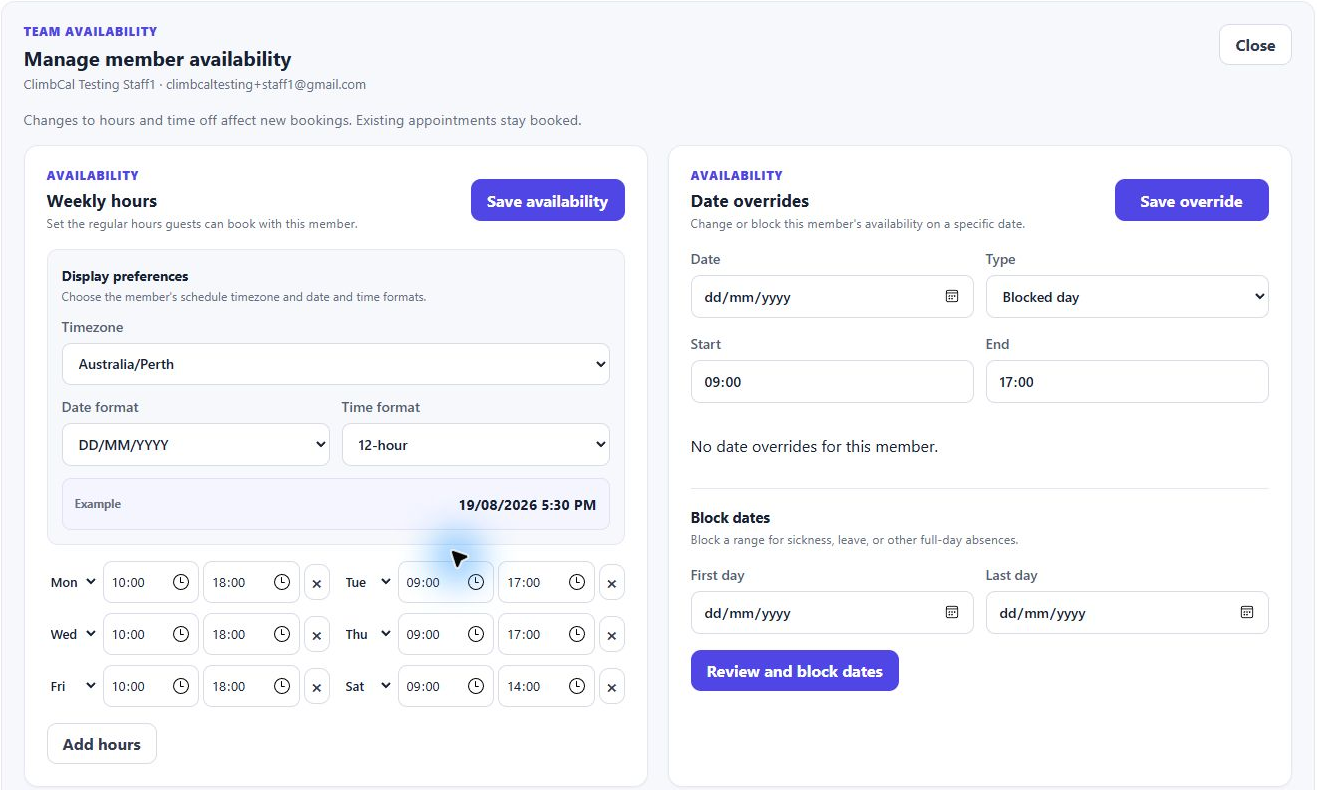
Real ClimbCal staff availability settings, including weekly hours and date overrides.
HOW IT WORKS
Set it up once, then make it easier for clients to find a time that works.
01
Add each service, its duration and the team members who provide it.
02
Choose working hours, preparation buffers and booking rules that suit your salon.
03
Clients choose a suitable slot and receive confirmation without calling.
Compare subscriptions and lifetime licence options, and check which features are included in each plan.
GOOD TO KNOW
Practical answers for beauty salons choosing an online booking system.
Can clients choose their preferred beauty therapist? +
Yes. With Advanced service bookings, assign eligible staff to each treatment and enable customer staff selection. Clients can choose an available therapist or select any available staff member.
Can I add the booking page to my salon website? +
Yes. Link a Book Now button to your ClimbCal booking page, or integrate the booking experience with your existing website. You can also share the link from your social profiles.
Can I take deposits for beauty appointments? +
ClimbCal supports fixed deposits and full payment through Stripe for eligible service bookings. Connect your own Stripe account and choose the payment approach for each service.
Can I manage several beauty therapists? +
Yes. Team workspaces let you manage individual availability, assign staff to services and review bookings in a shared list or calendar view. Check plan and seat inclusions on the pricing page.
Does ClimbCal include retail POS and inventory? +
ClimbCal focuses on appointment booking, availability, calendar sync and payments. If your salon needs a retail point-of-sale or stock management system, review those requirements separately.
GUIDES FOR YOUR SALON
Explore practical guides for setting up your salon’s online bookings.
Set up services, individual staff hours and customer staff choice.
Read the guide →
Compare the cost considerations for a salon booking system.
Read the guide →
Focus on the essentials for a home salon or independent beauty business.
Read the guide →
BUILT AROUND YOUR WORK
Make appointments easy for clients and manageable for your team, from the first treatment enquiry to the next confirmed booking.